
 AU
The best proof of delivery app is a driver app connected to your transport management system (TMS). When the app and your TMS work as one, job details, signatures, photos, and exceptions flow back to the office in real time instead of sitting in a separate tool waiting for someone to re-key them.
Sounds simple, right? It is, once you know what to look for.
Here’s a familiar scene. A customer calls asking where their pallet is. Your driver dropped it off two hours ago and has the signature on their phone, but it’s in an app that doesn’t talk to your TMS. So your team rings the driver, waits for a screenshot, and updates the job by hand. Multiply that by a few hundred jobs a week and you’ve got a real problem.
This guide walks you through what to check, which questions to ask vendors, and how your needs change depending on the freight you move.
What Does a Proof of Delivery App Actually Do?
An electronic proof of delivery app lets drivers record that a job is done, right from their phone. It captures signatures, photos, barcode scans, and the time and location of each delivery, replacing paper POD that gets lost, smudged, or stuck in a truck for days.
The payoff is faster invoicing, fewer disputes, and happier customers. For the full rundown, here’s how electronic proof of delivery works.
Standalone POD App or a Driver App Built Into Your TMS?
This is the biggest decision you’ll make, so it’s worth getting right.
How standalone apps work
Standalone proof of delivery apps are quick to set up and usually cheap to start with. Drivers download the app, capture the POD, and the record sits in the app’s own system.
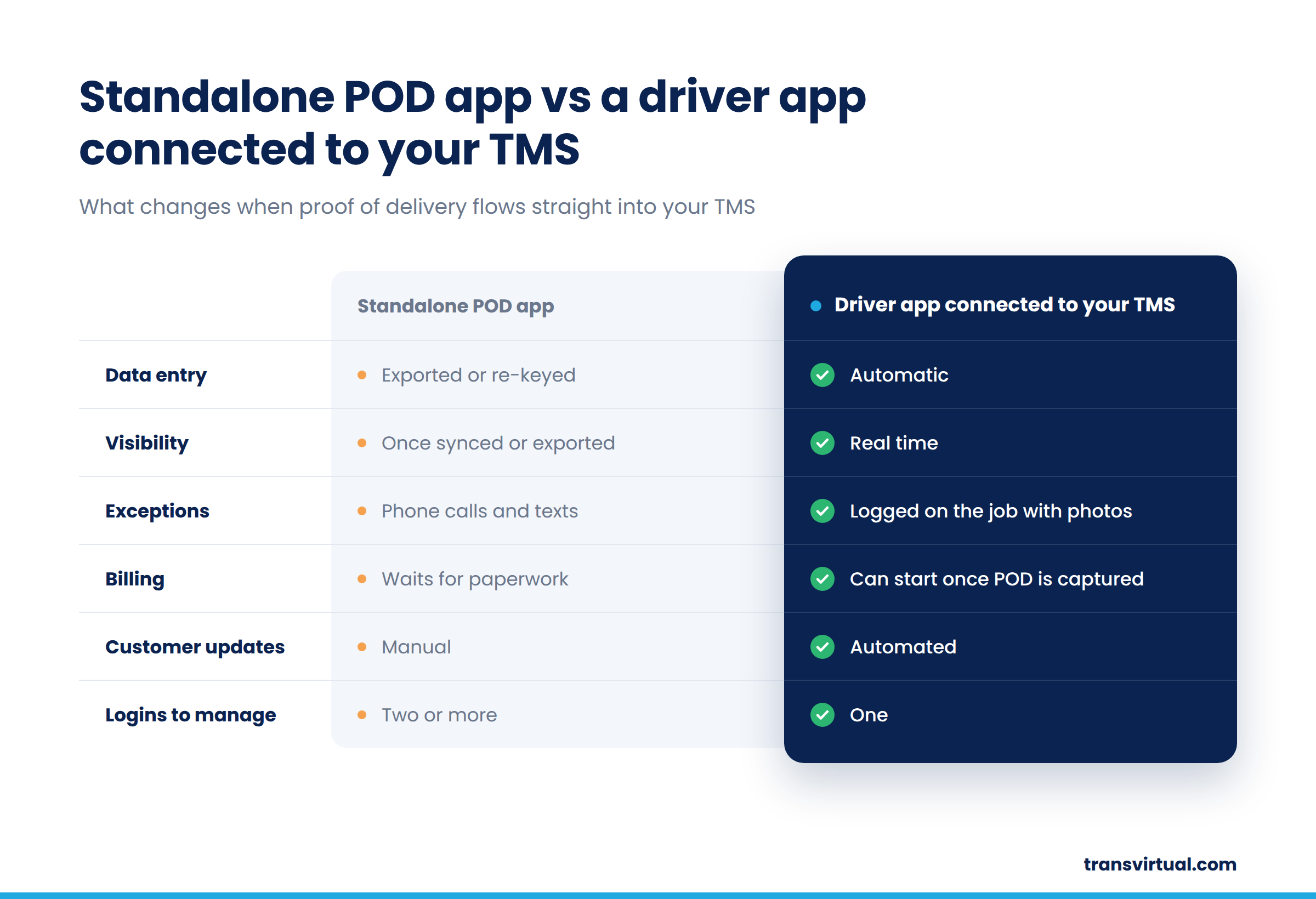
The catch shows up in the office. Because the app lives outside your TMS, someone has to export the data, match it to jobs, and update customers. Exceptions often arrive by text or phone call. And when a customer disputes a delivery, your team ends up digging through two systems to find the answer.
How a TMS-connected driver app works
A driver app built into your TMS works the other way around. Jobs go out from dispatch straight to the driver’s phone. When the delivery is done, the POD, photos, and any exceptions land back on the same job record.
That one record then powers everything else. Invoicing can start as soon as the job is complete. Customers can see their POD without calling you. Your reports reflect what happened today, not what got keyed in yesterday.
A standalone app solves the paper problem. A delivery management app connected to your TMS solves the visibility problem too, and that’s where the real time savings sit. It also means your whole operation runs on one fleet driver app instead of a patchwork of tools.
What to Check Before You Choose a Proof of Delivery App
Ready to compare your options? Use these as your buying criteria. Each one is something you can ask to see during a vendor demo.
Capture options
Check that the app records signatures, photos, barcode scans, and a GPS timestamp on every delivery. Better still, check whether the time and location are captured automatically. If drivers have to remember an extra tap, it won’t happen on a busy Friday afternoon.
Offline mode
Mobile coverage drops out in regional areas, basements, and big warehouses. Check that drivers can capture POD with no signal and that the app syncs on its own once they’re back in range. Ask what happens to a job captured offline. Does it queue safely, or can it go missing?
Device support
Check that the app runs on both iOS and Android. This matters even more if drivers use their own phones, because you can’t control what they carry. Ask about minimum operating system versions too.
Live job and dispatch updates
Plans change throughout the day. Check that new jobs, address changes, and cancellations reach the driver’s phone straight away, without a call from dispatch. The less your team has to ring drivers, the more time they have for everything else.
Navigation and route planning
Check whether drivers get turn-by-turn directions and a run sheet in a sensible stop order. A good route planner inside the app saves fuel and time, and it stops drivers juggling between apps. We cover this in more detail in our guide to GPS navigation for drivers.
Exceptions, damages, and futile deliveries
Not every delivery goes to plan. Check that drivers can record a reason for a failed or futile delivery, photograph damaged freight, and flag it straight back to the office. Those records protect you when a customer or carrier disputes a charge.
Multi-drop runs
Check how the app copes with a run of 20, 50, or 100+ stops. Can drivers see the full sequence? Can they record a partial delivery, or skip a stop and come back to it later? Small frustrations here add up quickly.
Subcontractor and owner-driver access
Plenty of Australian fleets rely on subbies and owner-drivers. Check that they can use the same app as your employed drivers, so every POD lands in the same place no matter who did the job.
Customer notifications
Check whether the app triggers automatic ETAs, delivery confirmations, and POD access for your customers. Every notification that goes out on its own is one less “where’s my freight?” call for your team.
Ease of use
Finally, check how easy the app is for drivers to pick up. Look for large buttons, clear screens, and as few taps as possible per job. Ask how long it takes to train a new driver. If the answer is longer than a short walkthrough, getting drivers on board will be a struggle.
Choosing a Proof of Delivery App for Your Type of Operation
Every operation is different, so the features that matter most will shift depending on what you move and how.
Courier and last mile
Courier work is all about volume. Drivers can complete dozens of drops a day, so speed counts. Look for fast capture, smart stop sequencing, and automated customer notifications. A few seconds saved per stop turns into hours saved across a week.
Linehaul
Linehaul runs have fewer drops, bigger consignments, and long stretches between stops. A truck driver app built for linehaul needs reliable offline capture, strong barcode and pallet scanning, and clear exception handling for damaged freight. When one consignment is worth thousands, a solid record is essential.
Mixed and owned fleets
If you run a mix of employed drivers, subbies, and owner-drivers, consistency is the goal. One fleet driver app for everyone means one process, one set of records, and full visibility across your fleet, whoever is behind the wheel.
How Transvirtual’s Driver App Handles Proof of Delivery
Transvirtual’s delivery driver app is part of the Transvirtual TMS, so there’s no separate tool to manage. Drivers capture POD on their phones, and it lands on the job record for your office to see.
It also ticks the boxes that trip up many standalone apps. Drivers can capture POD even without signal, and the app syncs once they’re back in coverage. It runs on both iOS and Android, so drivers can work on devices they already know. Subcontractors and owner-drivers can use it too, which keeps every delivery record in one place.
Make Every Delivery Count
Here’s one last tip before you choose: run a real job through each app, from dispatch to POD to invoice. If anyone has to re-enter data along the way, the app isn’t connected enough.
Transvirtual’s driver app captures POD straight into your TMS, so your office sees every delivery as soon as it syncs. Explore electronic proof of delivery with Transvirtual.

 Visit our US site