Shipping label software for online retailers, manufacturers, and more
Manage carrier services and quickly generate carrier-approved parcel labels.
Before
Transvirtual
vs.
Printing labels had to be done separately, requiring duplicate data entry and increasing the risk of errors
Separate printer setup
Time-consuming shipping workflows
Individually processed each consignment
After
Transvirtual
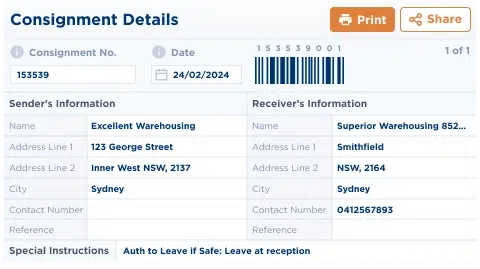
Print shipping labels directly from within any consignment in just a few clicks
Easily create and print labels with our handy cloud printer setup
Rapid label generation for high-volume shipments
Process multiple consignments at once
Features to reduce the time it takes to print shipping labels and manage carriers
Streamlined Label Printing
No need to toggle between systems
Print shipping labels directly from any consignment with just a few clicks.
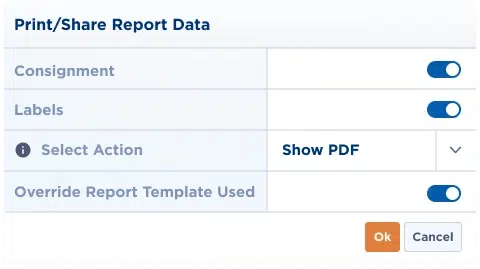
Select the print share option and choose "consignments and labels" to instantly generate professional shipping labels.
Efficient Bulk Processing
Save time and resources
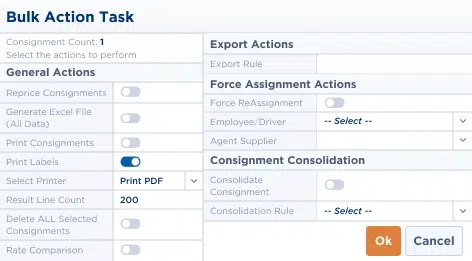
Save time with our bulk label processing capability.
Select multiple consignments simultaneously, then use the bulk action tasks option to generate all required labels in one batch—perfect for high-volume shipping operations
No Need to Switch Systems
Prevent data entry error
It’s a built-in feature, so you can print directly from your FMS account!
This ensures consistent formatting, prevents data entry errors, and ensures accurate shipping information across all your business documents.
From within the consignment, select the "print/share pdf" option, then choose "consignments and labels" and click OK. The system will automatically generate and print your label with the consignment details.
Self-managed transport integration is a built-in FMS (freight management system) feature. The feature allows shippers to connect with local and nationwide carriers and
 No, stay on AU site
 Visit our US site